

System Overview
Untrace consists of several key components working together to provide seamless webhook development: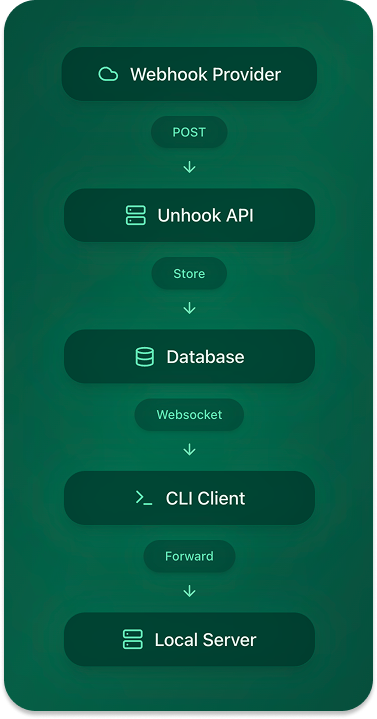
Data Flow Steps
1
Webhook Reception
- Provider sends webhook to
https://untrace.sh/t_123?e=ENDPOINT - API validates the API key and processes the request
- Event is stored in the database
2
Real-time Distribution
- CLI clients subscribe to new events
- Database triggers notify connected clients
- Events are delivered to local development servers
3
Local Processing
- CLI delivers requests to specified port or URL
- Responses are captured and stored
- Results are visible in the dashboard
Database Schema
Core Entities
Users and Organizations
Webhooks and Connections
Key Tables
Users
Organizations
Webhooks
Events
Configuration Types
Webhook Configuration
Component Architecture
API Server
The API server handles:- Webhook reception and validation
- Event storage and distribution
- Authentication and authorization
- Team management
- Real-time updates
CLI Client
The CLI client manages:- Local webhook connections
- Event subscription
- Request delivery
- Health monitoring
- Debug logging
Dashboard
The web dashboard provides:- Real-time event monitoring
- Team management
- Configuration controls
- Analytics and debugging
- Request/response inspection
Security Model
-
API Authentication
- API keys for webhook endpoints
- JWT tokens for dashboard access
- Role-based access control
-
Data Privacy
- Configurable header filtering
- Request/response body size limits
- Sensitive data redaction
-
Team Access
- Organization-based isolation
- Member role management
- Shared webhook endpoints
Scaling Considerations
-
Database
- Real-time notification system
- Event archival strategy
- Connection pooling
-
API Layer
- Request rate limiting
- Load balancing
- Regional distribution
-
Event Processing
- Retry mechanisms
- Failure handling
- Queue management
Development Setup
For local development:- Database
- API Server
- CLI Development
Best Practices
-
Event Handling
- Implement proper retry logic
- Handle timeouts gracefully
- Log relevant debugging info
-
Security
- Rotate API keys regularly
- Monitor failed attempts
- Review access logs
-
Team Workflow
- Use meaningful client IDs
- Configure appropriate timeouts
- Set up health checks